The Nutrition Label Scanner
Point your camera at any nutrition facts panel and NutriKit extracts every value — calories, all macros, every micronutrient listed. But unlike most scanner apps, it doesn't just dump the numbers into your diary. It shows you exactly what it read, so you can verify and correct before saving.
This matters because OCR isn't perfect. Glare, curved surfaces, small print, and unusual label layouts can all cause misreads. NutriKit's review step catches these errors before they corrupt your data.
The scanner also works on the front of packages — the marketing panel with claims like “12g protein” or “130 calories.” Point at that and NutriKit creates a partial food entry with whatever values are visible, which you can then complete manually or by scanning the back label.
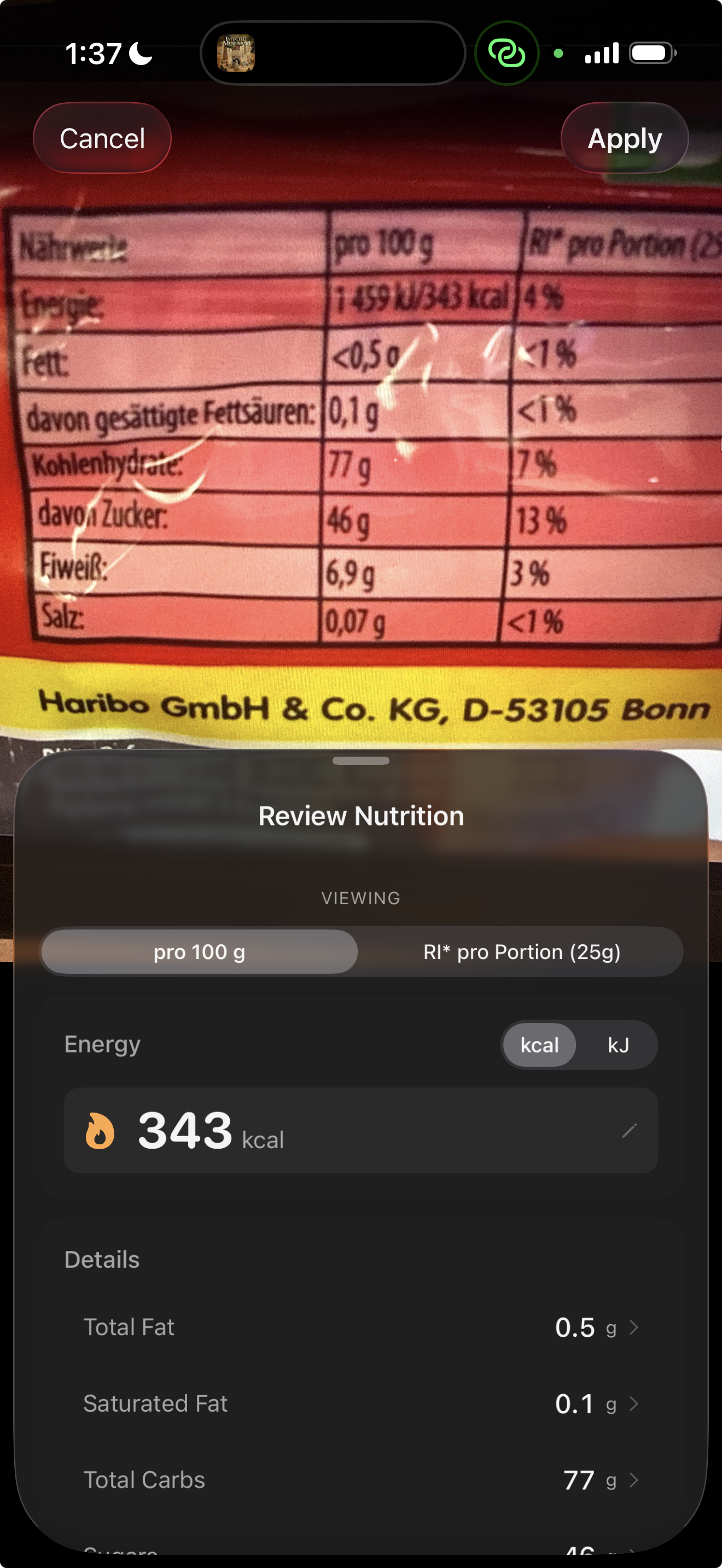
What the scanner captures
From a standard US nutrition facts label, the scanner reads:
- Serving size and servings per container
- Calories
- Total fat, saturated fat, trans fat
- Cholesterol, sodium
- Total carbohydrate, dietary fiber, total sugars, added sugars
- Protein
- Vitamin D, calcium, iron, potassium
- Any additional vitamins or minerals listed
All values are captured per serving. When you log the food, you specify how many servings you had, and NutriKit scales everything proportionally.
The scanner uses on-device vision processing — your label images are never uploaded to a server. Privacy is preserved by default.
The USDA Verified Database
Most nutrition apps rely on user-submitted food databases. The problem? Users make mistakes. They round numbers, skip micronutrients, and create duplicate entries with conflicting data. Over time, the database becomes unreliable.
NutriKit includes the USDA FoodData Central database — thousands of foods with laboratory-tested nutritional profiles. These aren't user-submitted approximations. They're measured values from analytical chemistry, covering a comprehensive nutrient profile per food.
When you search for a food in NutriKit, USDA-verified results are clearly marked. You can trust that “chicken breast, roasted” has accurate protein, fat, B-vitamin, and mineral values — because they were measured in a lab, not typed in by a random user.
Why lab-tested data matters
Consider vitamin K. Most user-submitted databases don't include it at all. But the USDA database measures it for thousands of foods. If you're on blood thinners and need to monitor vitamin K intake, user-submitted data is useless — you need verified values.
The same applies to minerals like selenium, manganese, and phosphorus. To micronutrients like folate, choline, and vitamin E. To fatty acid breakdowns (saturated vs. mono vs. poly). The USDA database captures all of these. User databases typically capture only calories and the big three macros.
NutriKit makes the full nutrient profile available and trackable — not just the headline numbers.
AI Quick Log
Sometimes you just need to log fast. You're at a restaurant, you're eating at a friend's house, or you just don't have a label to scan. AI Quick Log handles these moments.
You can input your meal three ways:
- Photo — take a picture of your plate and AI identifies the foods, estimates portions, and calculates macros
- Voice — say “I had a grilled chicken salad with ranch dressing and a bread roll” and AI parses it into individual food items with estimated quantities
- Text — type a quick description and get the same AI parsing
In every case, AI returns a structured list of detected items, each with estimated calories, protein, carbs, and fat. But here's the critical difference from other AI logging apps: you review everything before it's saved.
The review-before-saving philosophy
AI estimation is fast but imperfect. Portion sizes are guessed. Similar-looking foods can be confused. A “grilled chicken breast” might be 4oz or 8oz — the AI can't weigh it for you.
That's why NutriKit always shows you what AI detected and lets you:
- Edit any item's quantity or nutritional values
- Replace a detected item with a different food from the database
- Remove items that were incorrectly detected
- Re-run the AI with a different prompt if the result was off
- Add items that were missed
This gives you the speed of AI with the accuracy of manual review. It's a fundamentally different approach from apps that auto-log AI results and silently accumulate errors in your diary.
Accuracy hierarchy
NutriKit's logging methods form an accuracy spectrum:
- Label scanner — highest accuracy. You're reading the manufacturer's own declared values. Short of sending food to a lab, this is as precise as consumer nutrition data gets.
- USDA database — high accuracy. Lab-tested values for generic food items. Excellent for whole foods, produce, meats, and staples.
- AI Quick Log — moderate accuracy. Good for quick estimates and hard-to-measure meals, but inherently imprecise for portion sizes.
NutriKit is opinionated about this hierarchy. When precision matters — tracking micronutrients, maintaining a strict deficit, or monitoring specific nutrients for medical reasons — it nudges you toward the scanner and database. When you just need to capture a meal before you forget it, AI is there.
The goal is to make accurate logging easy, and fast logging available — without pretending they're the same thing.