Tapered Targets
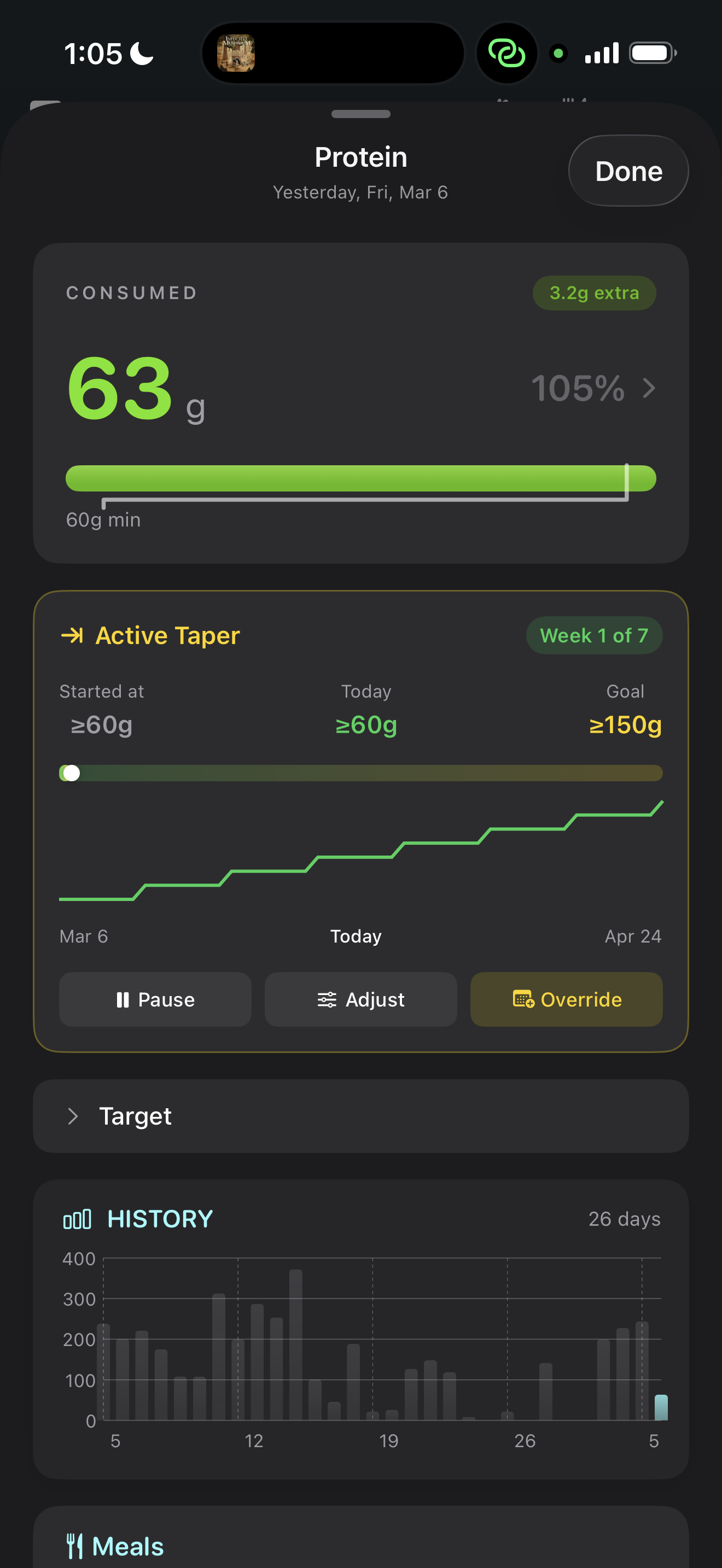
A taper lets you smoothly transition any nutrient target from one value to another over a period of time. Instead of abruptly switching from 250g carbs to 150g carbs, you define a start value, an end value, and a duration — and NutriKit interpolates your daily target across that window.
This is how competitive athletes periodize their nutrition. It's how people gradually reduce calories during a cut. And it's how you can slowly increase protein intake without shocking your digestive system or your grocery budget.
Setting up a taper
For any nutrient, you can create a taper by specifying:
- Start value — where you are now (or any custom starting point)
- End value — where you want to be
- Start date — when the taper begins (defaults to today)
- Duration — how many days the taper runs
- Curve shape — how the interpolation behaves between start and end
Once active, your daily target is automatically calculated based on where you are in the taper timeline. You don't have to think about it — just log your food and NutriKit tells you today's number.

Curve shapes explained
The curve shape determines how the interpolation progresses between your start and end values. NutriKit offers four options:
- Linear — a straight line from start to end. Equal change every day. Simple and predictable. Best for moderate tapers where you don't need front-loading or back-loading.
- Stepped — the taper divides into equal-length steps (e.g., weekly blocks). Your target drops at the start of each step and stays flat within it. This mimics how many coaches program nutrition phases.
- Ease-in — changes slowly at first, then accelerates toward the end. Useful when you want to ease into a taper gently.
- Ease-out — changes quickly at first, then decelerates. Useful when you want to make the big move early and fine-tune toward the end.
All four curves arrive at the same end value on the same date. The difference is the path taken.
Managing active tapers
Once a taper is running, you're not locked in. You can:
- Pause the taper — freezes your current interpolated value. The taper resumes from where it left off when you unpause.
- Adjust the end value or duration mid-taper — the remaining days recalculate smoothly from today's value to the new end.
- Override a single day — if you need a different target for just today, you can set a manual override without disrupting the taper.
- Cancel the taper — your target reverts to whatever it would be without the taper.
Multiple nutrients can have independent tapers running simultaneously. You might taper carbs down over 6 weeks while simultaneously tapering protein up over 4 weeks.
Workout Bonuses
On days you exercise, your nutritional needs change. You burn more energy, you break down more muscle protein, and you deplete more glycogen. NutriKit's workout bonuses let your targets respond to this automatically.
When Apple Health reports active energy burned from a workout, NutriKit can increase your protein and carbohydrate targets for that day. The bonus is applied in real time — as your workout data syncs, your targets update.
Adaptive vs. fixed bonuses
NutriKit offers two bonus modes:
Adaptive bonuses scale with how much you burned. You configure a bonus per 100 kcal of active energy. For example, +5g protein per 100 kcal burned means a 400 kcal workout adds 20g to your protein target. A 200 kcal workout adds 10g. The bonus is proportional to the effort.
Fixed bonuses add a flat amount regardless of workout intensity. If you set +30g carbs as a fixed bonus, any workout day gets +30g — whether you did a 20-minute walk or a 90-minute lifting session.
Adaptive is better for people with variable workout intensities. Fixed is simpler and works well when your workouts are consistent.
Eating windows around workouts
Workout bonuses can be configured with an optional eating window. This means the bonus only applies to meals logged within a certain time range around your workout — for example, 1 hour before to 3 hours after.
This supports peri-workout nutrition strategies where you want to concentrate extra protein and carbs around training, rather than spreading the bonus across the whole day. If no eating window is set, the bonus applies to your full-day target.
How it all stacks together
Tapers and workout bonuses aren't mutually exclusive — they compose. Here's the order of operations for any given nutrient on any given day:
- Start with the base target — either the Smart Target (calculated from your profile) or a manual override
- If a taper is active, the base target is replaced by the interpolated taper value for today
- If a workout bonus is configured and you've burned active energy today, the bonus is added on top
This means you can run a 6-week carb taper from 300g to 200g, and on workout days within that taper, your carbs still get a bump. The system is composable by design.